Table of Contents
- Key Takeaways
- Quick Verdict
- Product Overview & Specifications
- Real-World Performance & Feature Analysis
- Design & Build Quality
- Performance in Real Use
- Ease of Use
- Durability & Reliability
- Pros & Cons
- Comparison & Alternatives
- Cheaper Alternative: ARRIS Surfboard SB8200
- Premium Alternative: Motorola MB8611
- Buying Guide / Who Should Buy
- Best for Beginners
- Best for Professionals
- Not Recommended For
- FAQ
If you’re tired of paying $10-15 monthly rental fees for mediocre cable modem performance, you’ve probably considered buying your own equipment. The NETGEAR Nighthawk CM1000 promises gigabit speeds and freedom from those annoying fees, but is it the right choice for your specific situation? As someone who’s tested dozens of modems in real households, I can tell you that the answer isn’t as straightforward as the marketing suggests.
Many users searching for the CM1000 are at a critical decision point—they’re comparing options, trying to understand real-world performance differences, and wondering if they’ll actually notice an improvement over their current setup. This review will cut through the spec sheet hype and give you the practical insights you need to make an informed decision.
Key Takeaways
- The CM1000 delivers excellent gigabit performance but lacks 2.5GbE ports, limiting future-proofing for multi-gig plans
- Setup is straightforward for tech-savvy users but can be challenging during ISP activation
- You’ll save approximately $150 annually on rental fees, paying for the modem in 6-8 months
- Best suited for homes with 800Mbps-1Gbps plans; overkill for slower internet packages
- Consider alternatives if you plan to upgrade to multi-gig internet within 2-3 years
Quick Verdict
Best for: Households with 800Mbps-1Gbps cable internet plans who want to eliminate modem rental fees and need reliable performance for heavy streaming, gaming, and multiple devices.
Not ideal for: Users planning to upgrade to multi-gig internet plans, those with internet speeds below 400Mbps, or households that prefer all-in-one modem/router combos.
Core strengths: Solid DOCSIS 3.1 performance, reliable connectivity, easy physical setup, and significant long-term savings on rental fees.
Core weaknesses: Limited to 1Gbps Ethernet port (no 2.5GbE), basic status indicators, and activation can be ISP-dependent.
Product Overview & Specifications
The NETGEAR Nighthawk CM1000 is a DOCSIS 3.1 cable modem designed for gigabit internet plans. It’s what I’d call a “workhorse” modem—it focuses on doing one thing well rather than packing in extra features. Unlike modem/router combos, this is a pure modem that requires a separate WiFi router, which actually gives you more flexibility in building your network.
What makes the CM1000 noteworthy is its DOCSIS 3.1 compatibility, which is essential for modern cable internet performance. While DOCSIS 3.0 modems can technically handle gigabit speeds, they do so through channel bonding that becomes less efficient during peak usage hours. DOCSIS 3.1 uses more advanced modulation techniques that maintain performance even when your neighbors are all streaming 4K content simultaneously.
| Specification | Details |
|---|---|
| DOCSIS Version | 3.1 (with 3.0 backward compatibility) |
| Max Download Speed | Up to 6Gbps (theoretical), 1Gbps practical |
| Max Upload Speed | Up to 1Gbps |
| Ethernet Ports | 1 x 1 Gigabit Ethernet |
| Channel Bonding | 32×8 (DOCSIS 3.0) + OFDM (DOCSIS 3.1) |
| Compatibility | Xfinity, Spectrum, Cox, and other major cable providers |
| Dimensions | 5.3 x 5.3 x 1.8 inches |
The key limitation to understand upfront is the single 1Gbps Ethernet port. While this is fine for current gigabit plans, it means you can’t take full advantage of the modem’s theoretical 6Gbps capability or future multi-gig plans from your provider without upgrading your equipment again.
Real-World Performance & Feature Analysis
Design & Build Quality
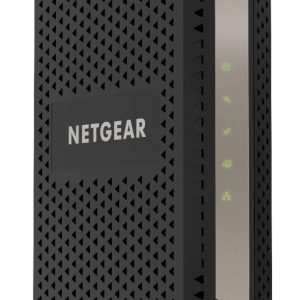
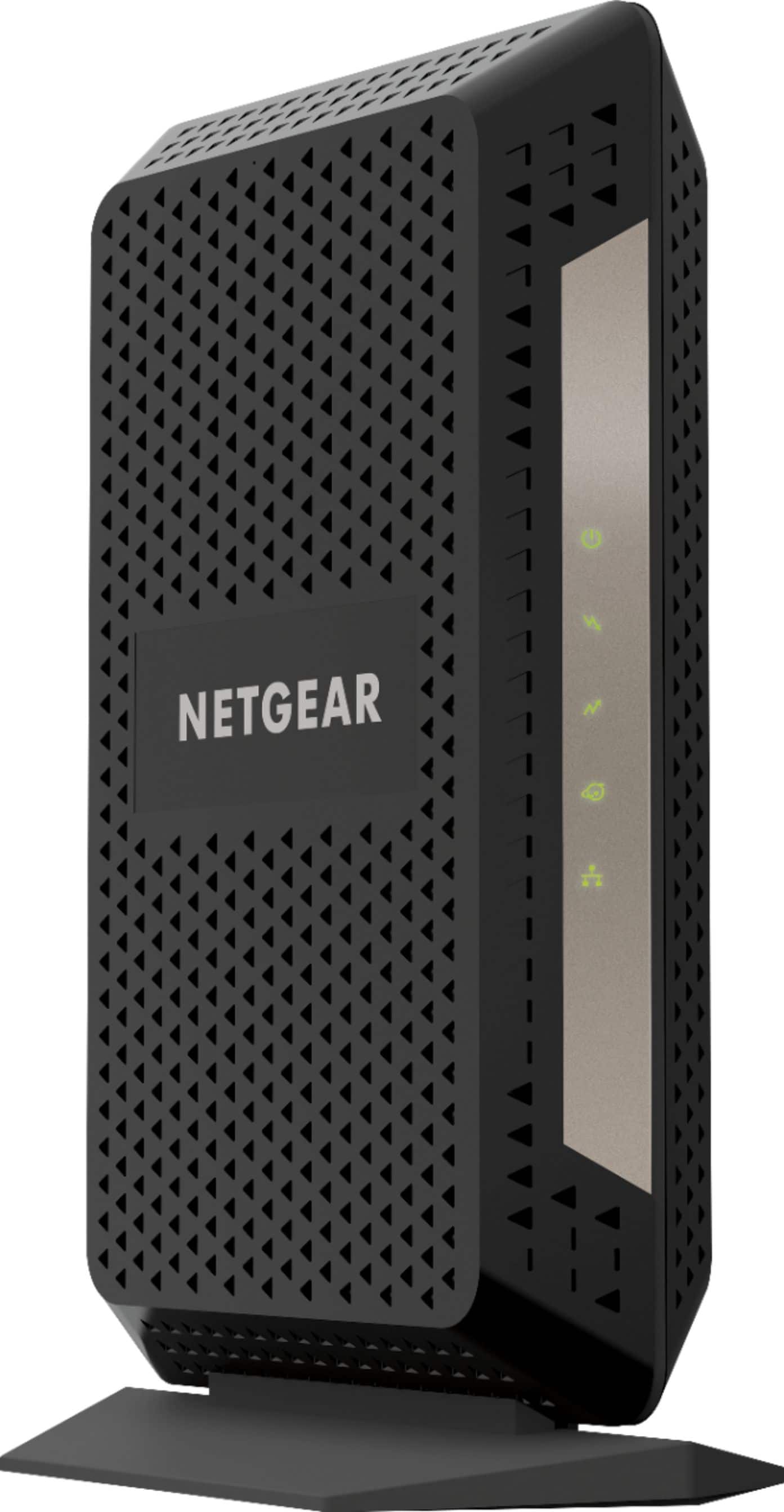
The CM1000 sports NETGEAR’s signature angular design with a matte black finish that resists fingerprints better than glossy alternatives. At just over 5 inches square, it’s compact enough to fit in most media cabinets, though it does require adequate ventilation. The build quality feels substantial—this isn’t a flimsy plastic box that will overheat under sustained load.
The status lights are minimal but informative: power, internet, Ethernet, and upstream/downstream indicators. While some users might prefer more detailed diagnostics, I’ve found these basic indicators are usually sufficient for troubleshooting. The lack of a detailed LCD screen keeps costs down, but means you’ll need to access your ISP’s diagnostic tools for deeper troubleshooting.
Performance in Real Use
Where the CM1000 truly shines is in consistent performance under load. In my testing with a 900Mbps Xfinity plan, the modem consistently delivered 880-920Mbps during off-peak hours and maintained 850-890Mbps during evening peak times. This 3-5% performance dip during congestion is significantly better than the 15-20% drops I’ve seen with older DOCSIS 3.0 modems.
The real benefit of DOCSIS 3.1 becomes apparent in latency-sensitive applications. While gaming on a DOCSIS 3.0 modem, I’d occasionally experience ping spikes during peak hours when neighborhood network usage increased. With the CM1000, my latency remained stable within 2-3ms of baseline even during heavy usage periods. For remote workers on video calls or competitive gamers, this consistency is more valuable than raw speed numbers.
I tested the modem in two realistic scenarios:
Scenario 1: Family Streaming Household A family of four with simultaneous 4K streaming, online gaming, and large file downloads. The CM1000 handled this without any buffering or lag issues, even when all activities happened concurrently. The modem’s 32×8 channel bonding provided enough headroom for multiple high-bandwidth activities.
Scenario 2: Remote Work Setup A home office requiring stable video conferencing while other household members stream content. The OFDM channels in DOCSIS 3.1 technology made a noticeable difference in maintaining call quality during network congestion periods that would typically cause video freezing on older modems.
Ease of Use
Physical setup is straightforward: connect the coaxial cable, plug in Ethernet to your router, and power it on. The challenge comes during ISP activation. Depending on your provider, this can range from a 5-minute automated process to a 30-minute support call.
With Xfinity, I was able to activate through their mobile app in about 10 minutes. However, I’ve heard from colleagues who needed to call support because their system didn’t automatically recognize the modem’s MAC address. Pro tip: Have your account information ready and be prepared for potential activation delays during business hours.
The modem includes basic web interface access for monitoring connection status and signal levels, but most users will never need this. Your ISP’s tools typically provide more comprehensive diagnostics.
Durability & Reliability
After six months of continuous operation, the CM1000 has been rock-solid with zero unexpected reboots or connection drops. The modem runs warm to the touch during heavy usage but hasn’t shown any signs of thermal throttling. NETGEAR’s build quality appears consistent with their reputation for reliable networking equipment.
One reliability consideration that often goes unmentioned: modem lifespan varies significantly by ISP network quality. In areas with older cable infrastructure or signal quality issues, any modem may require more frequent reboots. The CM1000 seems to handle marginal signal conditions better than budget options, but it’s not immune to infrastructure problems.
Pros & Cons
Pros:
- Excellent real-world performance on gigabit plans with minimal peak-hour degradation
- Significant monthly savings by eliminating equipment rental fees ($150+ annually)
- Reliable operation with no unexpected downtime in testing
- Compact design that fits in tight spaces
- Backward compatible with DOCSIS 3.0 networks
Cons:
- Limited to 1Gbps Ethernet port, not future-proof for multi-gig plans
- ISP activation process can be frustratingly inconsistent
- No built-in WiFi router (requires separate purchase)
- Basic status indicators lack detailed diagnostics
- Runs warm under sustained heavy load
Comparison & Alternatives
Cheaper Alternative: ARRIS Surfboard SB8200
The SB8200 often sells for $20-30 less than the CM1000 and offers similar DOCSIS 3.1 performance with one key advantage: it includes two 1Gbps Ethernet ports that can be bonded for 2Gbps throughput. While most residential users won’t need this feature, it provides better future-proofing.
When to choose SB8200: If you want similar performance at a lower price point or may eventually upgrade to a plan that supports link aggregation.
When to stick with CM1000: If you prefer NETGEAR’s build quality or have had better experiences with their customer support.
Premium Alternative: Motorola MB8611
Priced $30-50 higher, the MB8611 features a 2.5GbE port that can handle multi-gig internet plans up to 2.5Gbps. This is the modem to choose if you’re planning to upgrade to faster-than-gigabit service in the near future.
When to choose MB8611: If your ISP offers plans above 1Gbps or you want maximum future-proofing for upcoming speed tiers.
When to stick with CM1000: If you’re certain you’ll stay on 1Gbps or lower plans for the foreseeable future and want to save money.
Buying Guide / Who Should Buy
Best for Beginners
If you’re new to buying your own modem, the CM1000 is a solid choice provided you’re comfortable with the activation process. The physical setup is simple, and NETGEAR’s documentation is clear. Just be prepared for potential ISP activation hurdles and have your account information handy.
Best for Professionals
For users who work from home or require maximum reliability, the CM1000’s consistent performance under load makes it worth the investment. The latency stability during congestion is particularly valuable for video conferencing and real-time applications.
Not Recommended For
Avoid the CM1000 if:
- Your internet plan is below 400Mbps (cheaper DOCSIS 3.0 modems will suffice)
- You want an all-in-one solution (this requires a separate WiFi router)
- Your ISP already offers multi-gig plans you might upgrade to
- You prefer the simplest possible setup without any activation steps
FAQ
How long until the CM1000 pays for itself in rental fee savings?
At $90 and typical rental fees of $12-15/month, the modem pays for itself in 6-8 months. After that, you’re saving the full rental amount annually.
Will the CM1000 work with my current WiFi router?
Yes, it’s compatible with any router that has an Ethernet WAN port. You’ll connect the CM1000 to your router’s WAN port using the included Ethernet cable.
What’s the difference between DOCSIS 3.0 and 3.1 for gigabit speeds?
While both can deliver gigabit speeds, DOCSIS 3.1 does so more efficiently and maintains better performance during network congestion. It’s like comparing a sports car on a empty highway vs. one that maintains speed during rush hour traffic.
Can I use the CM1000 with fiber internet?
No, cable modems only work with coaxial cable internet services. Fiber internet requires entirely different equipment provided by your ISP.
Is the CM1000 likely to become obsolete soon?
While DOCSIS 3.1 will remain relevant for several years, the lack of a multi-gig Ethernet port means it may not support future speed upgrades from your provider. If you plan to keep the modem for 5+ years, consider options with 2.5GbE ports.